How to Create a Wedding Registry: A Step-by-Step Guide

You create a wedding registry by choosing where your list will live, adding gifts you genuinely want at a range of prices, and sharing the link through your wedding website. Most couples start four to six months before the wedding. The whole thing can take an evening if you know what you are doing, and this guide walks you through each decision in order.
Key Takeaways
Start your registry about four to six months before the wedding, so guests have time to choose.
A universal registry (one list that holds gifts from any shop) saves you from juggling several store lists.
Build the list around your real daily life, with gifts at low, middle and high prices.
Share it on your wedding website, never printed on the invitation.
Track every gift as it arrives and write thank-you notes promptly.
What a wedding registry actually is
A wedding registry is a shared list of gifts you would like to receive. Guests open it, pick something, and mark it as bought so nobody doubles up. It spares your guests guesswork and spares you five identical toasters.
There are two main types. A store-specific registry only lets you pick items from one retailer. A universal registry lets you add gifts from any store, and some also offer cash funds, which are pots of money guests can contribute to for something like a honeymoon or a sofa. Some universal services take a processing fee when you withdraw cash, so read the terms before you commit.
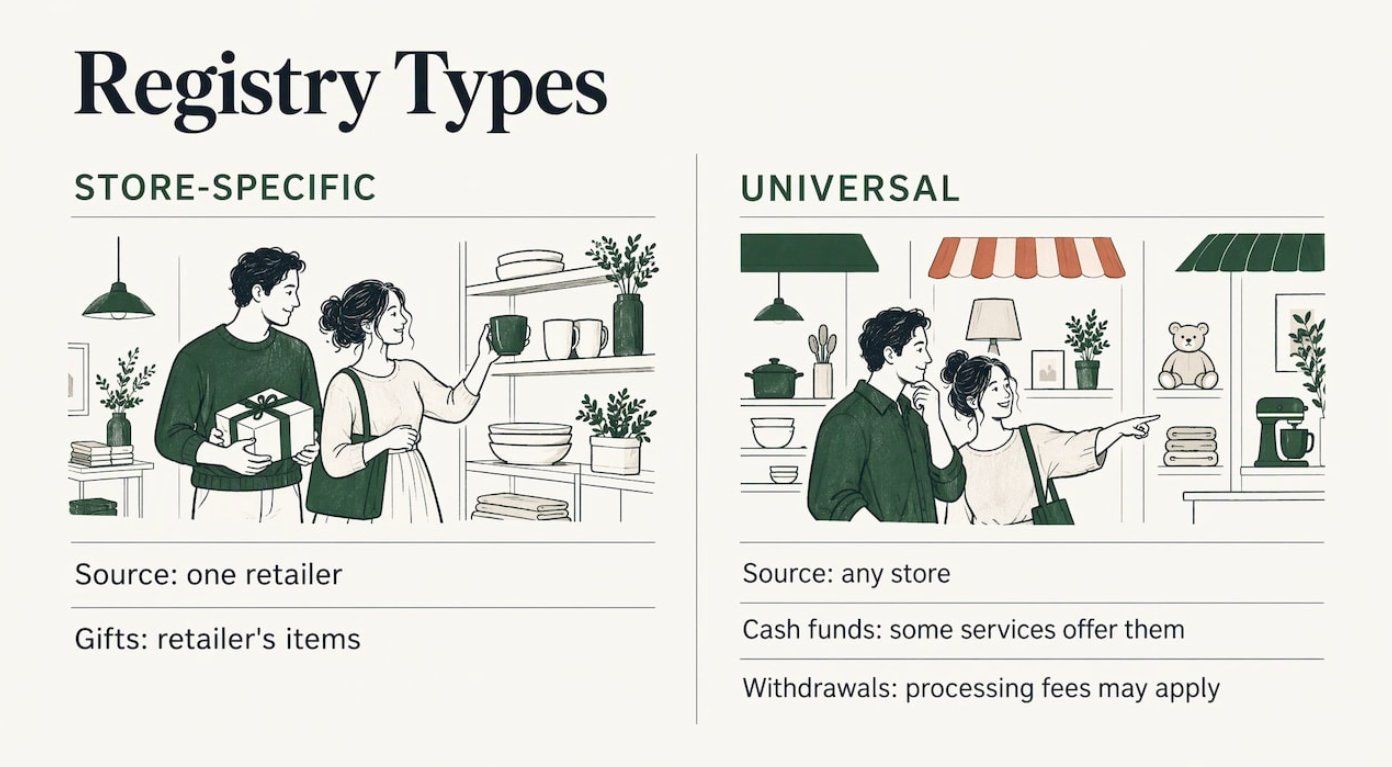
If you want a fuller comparison of the types, our guide to how gift registries work and how to choose one covers it.When to start your wedding registry
The usual advice is to set it up four to six months before the wedding. That gives guests time to shop, and gives you time to fill the list without rushing. The same source suggests aiming for roughly two gifts on the list per invited guest, so people always have a choice left when they come to it.
In practice, many couples start the list earlier, because engagement parties and pre-wedding gatherings often prompt guests to ask what you want. Having a link ready means you can answer in one message.
Create your registry in six steps
Decide what you need, want and dream of. Walk through your home room by room. Note what is worn out, what you have never owned, and what you would love but would never buy yourself.
Choose a registry type. If your wishes are spread across several shops (a kitchen retailer, a local ceramics maker, a bedding brand), a universal registry keeps them in one place.
Set up your account and name the registry. Add the wedding date, your names and a short welcome message.
Add your gifts. On a universal registry you paste the link of any product page. A browser extension, a small add-on for your web browser, lets you add an item with one click while you shop.
Mix the prices and add a group option. More on this below.
Share the link and keep an eye on what is being bought.
Choose gifts that reflect your real life
The most common mistake is registering for what you think people expect to see. A Wirecutter piece cites a University of California, Irvine marketing professor making exactly this point: the list should reflect your personal style and the life you actually live together, not an impression for onlookers.
Some practical ways to apply that:
If you cook every night, put the good chef’s knife and heavy casserole on the list, not a fondue set you will use once.
If you are moving into a bare flat, start with the basics: bed linen, towels, a kettle, a toaster.
If you already share a well-stocked home, lean towards experiences, upgrades and the things you keep postponing, like a proper vacuum cleaner or a garden bench.
If you love one hobby, add one or two items from a specialist shop. A list does not have to come from a single retailer.
For more inspiration by category, browse our wedding gift registry ideas.
Get the price mix right
Guests have different budgets, and the relationship matters. A colleague and a best friend will not spend the same, and neither should feel awkward about it. Consumer Reports recommends starting with your must-haves and then layering in a variety of price points, and it notes that group gifting, where several guests chip in for one larger item, is widely encouraged.
A Brides checklist suggests including items in three bands: lower-priced, middle-priced and higher-priced. A simple way to apply that is to think in thirds:
Band | What goes here | Example |
|---|---|---|
Small | Everyday items anyone can afford | Tea towels, a set of glasses, a good chopping board |
Middle | The things you will use daily | A casserole dish, a quality duvet |
Large | Big-ticket wishes, ideally open to group gifting | A sofa, a coffee machine, a honeymoon contribution |
If a pricey item is on the list, make it something several people can split. That way a generous aunt can cover a large share while a student friend adds a smaller amount to the same gift.
Share your registry the polite way
The best home for your registry link is your wedding website. According to the LA Times, it is generally considered poor etiquette to print registry details on a formal invitation. Instead:
Put the link on the wedding website and print only the website address on your invitations.
Let parents and the wedding party mention it if guests ask.
Include it on invitations to showers or engagement parties, where gifts are expected.
If someone asks on social media, point them to the website rather than posting the list publicly.
What to do once gifts start arriving
A good registry tool shows you which gifts have been bought and by whom, which makes the thank-you notes far simpler. Keep a running record as items arrive. Aim to write each note within a couple of weeks of receiving the gift, mention the item by name and say how you plan to use it.

Some guests will buy something off the list. Accept it warmly and thank them as you would for any other gift. A registry is a guide, not an obligation.
Our perspective on wedding registries
Most couples we talk to do not struggle with what to want. They struggle with where to put it. A kettle from one shop, a rug from another, a hand-thrown bowl from a maker they found on holiday: a store-bound registry forces you to pick one shop and drop the rest.
That is why we built Registryup around a single idea: paste a link from any store and it joins your list. There are no fees or markups for you or your guests, and you can see what has been bought and by whom, so nobody gets forgotten when it is time to say thank you.
We also think a registry should outlast the wedding. The same list habits carry over to a housewarming, a baby shower or a birthday, and one tidy place beats four scattered lists.
Start your list with Registryup
If you would like one list that holds gifts from any shop, you can set one up on Registryup. Paste a product link or use the browser extension, and your gifts sit together in a single shareable registry. It is free to use, with no fees or markups for you or your guests.
When you are ready for a home of your own, the same approach works for a housewarming registry, so you are not starting from scratch again.
Wedding registry questions couples ask
How many gifts should I put on my wedding registry?
A useful guide is around two gifts per invited guest, so the list never feels picked over. Cover a spread of prices so every guest can find something that suits their budget.
Can I use more than one shop?
Yes, and many couples do. A universal registry lets you collect items from several retailers in one list, so guests visit a single link instead of several.
Is it rude to ask for money or contributions?
Not when it is handled gently. Group gifts and cash funds are widely used, and offering them as one option among many lets guests choose what feels comfortable.
What if I have already lived together for years?
Register for upgrades and shared experiences instead of basics. Think better versions of what you already use, or something towards a honeymoon.
Sources
Recommended
Share